What it does
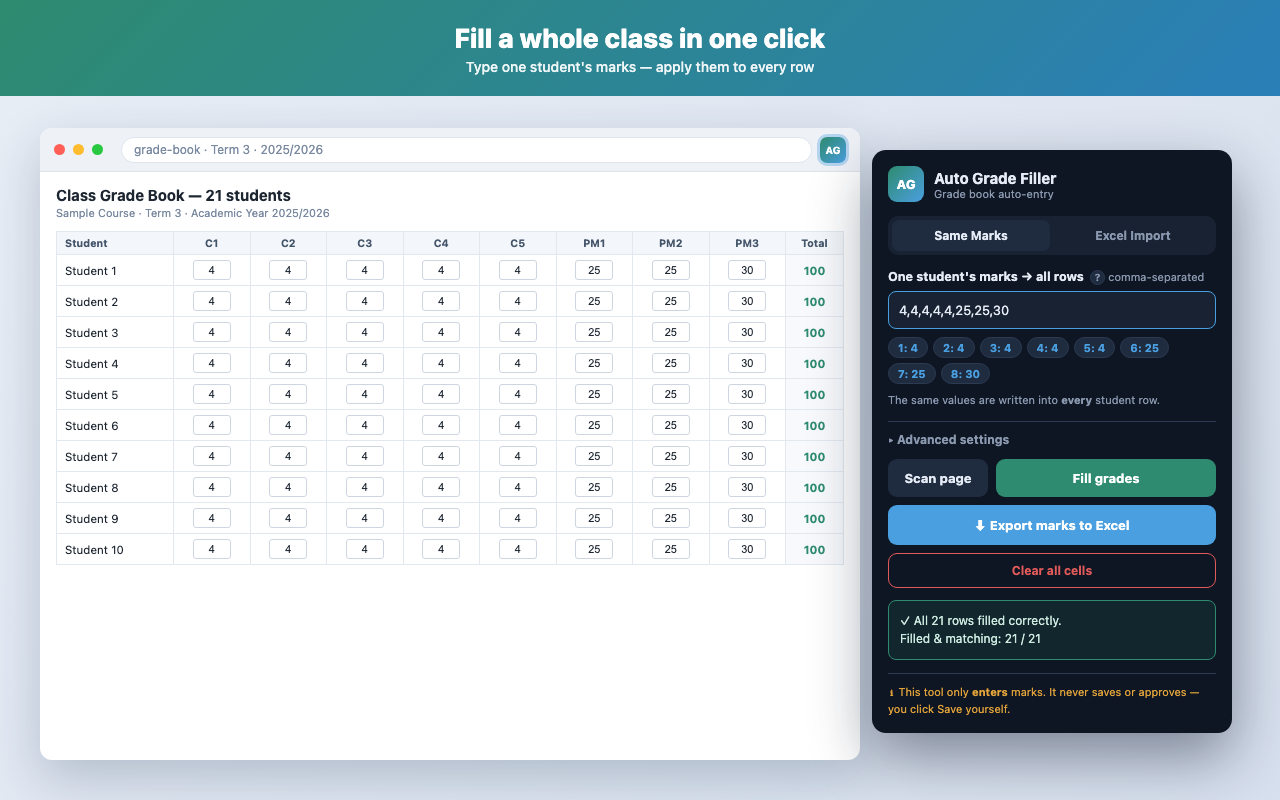
Auto Grade Filler is a Chrome extension for teachers using web-based grade books. It removes slow, repetitive manual mark entry — fill a whole class in one click, import marks from a spreadsheet, or export the current marks to Excel. It only ever acts on the tab you open it on, and only when you click a button.
Features
Same Marks
Type one student's marks and apply them to every row in one click.
Excel Import
Download a template pre-filled with your roster, enter marks, and upload to fill each student in order.
Export to Excel
Save the current grade table — names, IDs, and all marks — as a formatted .xlsx.
Clear all cells
Quickly reset the editable cells, with a simple Yes/No confirmation.
How to use
- Install Auto Grade Filler from the Chrome Web Store.
- Open your grade-book page (the screen with the editable grade grid).
- Click the Auto Grade Filler icon in the toolbar.
- Choose Same Marks or Excel Import, then click Fill grades.
- Review the marks and click your grade book's own Save button.
Privacy
No data is collected, transmitted, or shared. Everything runs locally in your browser — no analytics, no tracking, no remote code. Read the full Privacy Policy.
Support
Found a bug or have a question? Open an issue on GitHub and we'll take a look: